OC Maker Wheel – Spin a Random Character
An OC maker wheel helps you create a random original character (OC). Press "Spin all" and four wheels choose your character's hair colour, eye colour, skin tone and personality at once – then you draw or write the character that comes out.
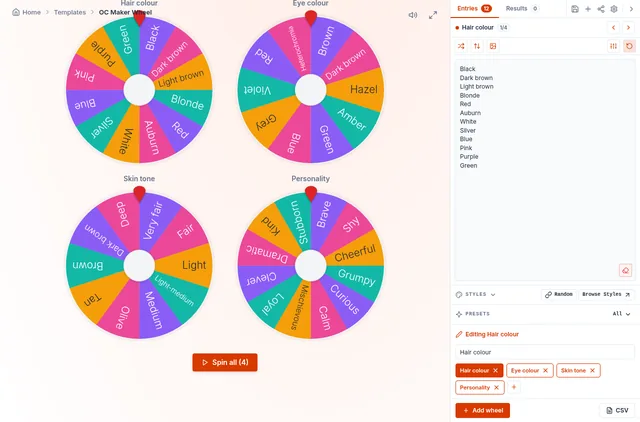
Edit any wheel to fit your story or art style: swap personality for a fantasy race, an outfit, a weapon or a zodiac sign. The wheels are saved on your device, and you can share the set with friends for an OC challenge.
How to Make an OC With the Wheel
Spin all
Four wheels decide hair colour, eye colour, skin tone and personality.
Sketch the basics
Draw a quick head-and-shoulders portrait with the colours you got.
Build the story
Use the personality to decide a name, a goal and one flaw. Spin again for a sidekick.
OC Challenges to Try
Daily OC challenge
Spin once a day and post your character – great for art practice.
Silver hair, amber eyes, olive skin, mischievous.
Writing prompts
Turn the result into a short character profile or story opening.
A shy hero with red hair.
Group art challenge
Share the wheel link; everyone spins and draws their own OC.
Discord art night.
Game characters
Use the wheels when creating characters in games or tabletop RPGs.
Pair with the d20 roller for stats.
Skin Tones and Inclusive Characters
The skin tone wheel covers a wide range from very fair to deep, so random characters reflect people from India, the Philippines and everywhere else. Change the labels to match the palette names your art app uses.
Is It Random?
Every entry has the same chance: the wheel picks with your browser's cryptographic random generator before the animation starts. Turn on Auto-remove winner to go through the whole list without repeats.
Each wheel is spun independently, so every combination is possible – there are 14,400 different combinations with the default lists.
Frequently Asked Questions
What is an OC?
How do I spin all four wheels?
Can I change the categories?
Can I share my OC wheel?
Related Wheels
More free tools in the same family.