Wheel of Names – Free Name Picker Wheel
A wheel of names is a spinning name picker: you paste a list of names, spin the wheel, and it lands on one person at random. Every name gets an equal slice, and the winner is chosen by your browser's secure random generator.
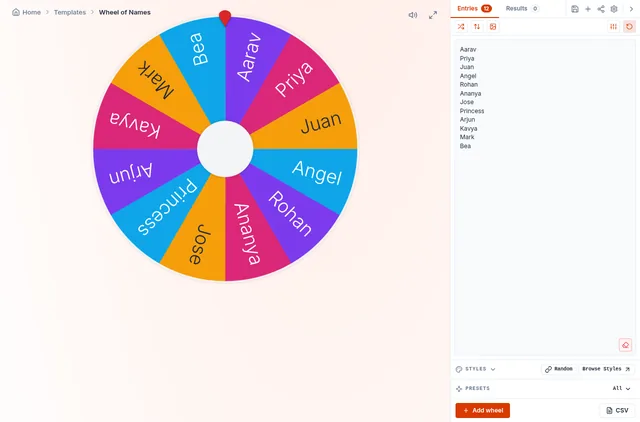
It is the quickest fair way to choose a student, a giveaway winner, a meeting host or whose turn it is. Paste names straight from Excel, Google Sheets, a WhatsApp chat or a class register – one name per line.
Looking for the Google spinner? Google's built-in spinner (search "spinner") only spins numbers from 2 to 20 – this wheel takes any names you type. See how to spin the wheel on Google.
Turn on "Auto-remove winner" to pick everyone once, use "Add wheel" to pick names for several roles at the same time, and keep a timestamped list of every result in the Results tab.
What Is a Wheel of Names?
A wheel of names is a name picker wheel that turns a list into slices of a circle. When you spin, the wheel slows down and stops with one name under the pointer. That name is your random pick.
Because everybody can see the full list and watch the spin, a wheel of names feels fairer than drawing from a hat or pointing at someone. Nobody can peek, and nobody can say the teacher or host chose a favourite.
The names never leave your device unless you create a share link, so you can use real student or customer names without worrying about where they end up.
You can use it to:
- Pick a random student to answer
- Draw a giveaway or contest winner
- Choose a presenter, reader or team captain
- Decide turn order for games
- Pick a Secret Santa or gift-exchange partner
- Select a random employee for a prize
Tip: duplicate a name to give that person two entries, or write "Name | 2".
How to Spin the Wheel of Names
Paste your names
Delete the sample names and paste your list, one name per line. Duplicate lines count as extra entries unless you turn off "Display duplicate names".
Spin
Click the wheel, tap it on your phone or press Ctrl + Enter. The wheel ticks past each name and stops on the winner.
Remove or keep
Use Popup mode to remove the winner with one tap, or turn on Auto-remove so the next spin only includes people who have not been picked yet.
When Should You Use a Name Spinner?
Classrooms
Call on students without bias. Projected in fullscreen, the name spinner keeps the whole class watching – and nobody gets picked twice when Auto-remove is on.
"Who reads the next paragraph?" – spin instead of waiting for volunteers.
Giveaways
Paste commenter names from your post, spin, and record the screen. The Results tab shows the exact time of the draw.
Facebook page giveaways, Instagram contests, school fair raffles.
Teams and offices
Choose who leads stand-up, who takes notes or who picks the team lunch. It removes the awkward "you do it" moment.
Weekly meeting host, cleaning roster, Friday quiz master.
Live events and streams
A big, colourful wheel works well on a projector or stream overlay window, and the tick sound builds suspense.
Raffles at a debut or wedding, YouTube live giveaways, church events.
Wheel of Names for Classrooms
Teachers use the wheel of names more than anyone. A few settings make it work better in class:
- Auto-remove winner so every student is called once before anyone is called again. Press the reset button to bring the full class back.
- Save your class lists with the save icon – Grade 5 Section A, Grade 5 Section B – and open them from My Wheels next lesson.
- Fullscreen for the projector or smart board, and a slower spin (Customize → Spin duration) for more suspense.
- Blind mode hides the names while spinning if you want a surprise.
For a dedicated classroom version with seating and group presets, see the classroom name picker.
Features of This Name Picker Wheel
Unlimited names
Paste 10 names or 5,000. Limit the labels shown for big lists – every name keeps an equal chance.
Remove after each spin
Auto-remove or one-tap Remove keeps draws fair when everyone should get one turn.
Multiple wheels
Pick a name and a task, or a winner for each prize, with up to four wheels and "Spin all".
Shuffle and sort
Mix the order or sort A–Z with one click. Order never affects the odds.
Themes and colours
Flag colours, pastel, dark mode and custom colours per name.
Share the same wheel
Create a link so students or followers can open and spin the same wheel of names.
Is This Wheel of Names Truly Random?
Yes. The winning name is chosen with the browser's cryptographic random generator (crypto.getRandomValues) before the wheel starts turning, and the animation then stops inside that name's slice. The order of your list, the speed of your click and the spin time make no difference. If a name appears twice it has twice the chance – that is the only way to change the odds, and it is visible on the wheel.
Frequently Asked Questions
Can I paste names from Google Sheets or Excel?
Is the wheel of names truly random?
Can I remove names after each spin?
How many names can I add?
Can I pick multiple winners?
Is it free and without sign-up?
Can teachers use it in class?
Spin Your Wheel of Names
Paste your list and let the wheel pick – it takes less than ten seconds.
Spin the Wheel of NamesRelated Wheels
More free tools in the same family.
From the blog