How to Make Fair Random Groups in Class (Without the Same Teams Every Time)
The fairest quick way to make groups is to shuffle the whole class list and split it into groups of the size you need. A properly shuffled list gives every student the same chance of being with anyone else, nobody is "picked last", and you can show the result on the board in seconds. When groups also need a planned mix, shuffle within smaller lists first, then combine.
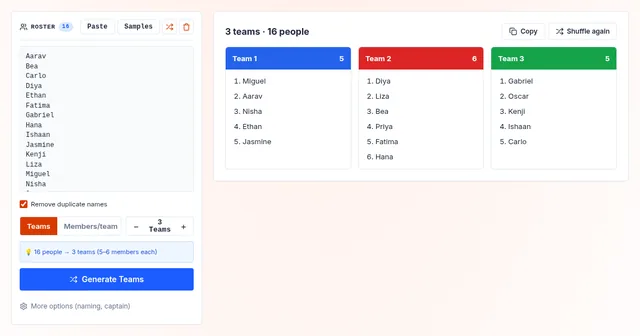
Try it: paste your class list, choose the number of groups or students per group, and generate. Name the groups by number, colour or animal, and mark a leader for each.
Open the random team generatorWhy not just let students choose?
Friend groups are comfortable, but the same students end up together, and some students are left looking for a group every time. Captains picking teams is worse: someone is always chosen last, in front of everyone. A visible random method takes the social pressure out.
How does shuffle-and-split work?
- Take the list of students who are present today.
- Shuffle it so every order is equally likely. Our generator uses the Fisher–Yates shuffle with your browser's secure random generator.
- Cut the shuffled list into groups: by number of groups ("5 groups") or by size ("4 per group").
Counting off ("1, 2, 3, 4, 1, 2…") looks random but is not: students quickly learn to change seats to land with a friend.
How do you balance groups without losing fairness?
Sometimes groups need a mix – of confident and less confident readers, for example. A simple method:
- Split the class into two or three lists by the thing you want to balance.
- Generate the same number of groups from each list.
- Combine group 1 from each list, group 2 from each list, and so on.
Every student is still placed at random within their list, and every final group gets the mix you planned.
How do you avoid the same groups every week?
- Generate new groups for each new task instead of keeping groups all term.
- Keep a note of last week's groups; if the same group comes up again, generate again and say why.
- For long projects, keep groups for the whole project, then shuffle for the next one.
What group size works best?
It depends on the task. Pairs suit quick discussions, groups of three or four suit most activities, and bigger groups work for presentations or games where roles can be shared. If the class does not divide evenly, choose the number of groups rather than the group size, and accept that some groups will have one more student.
What if students are absent?
Remove absent students from the list before you generate – do not generate with the full roster and then patch holes. If a student arrives late, add them to the smallest group.
How do you pick a group leader or presenter?
Mark the first person in each group as the leader, or spin the classroom name picker with just that group's names. For the order in which groups present, draw it with the random name picker.
How do you make it feel fair to students?
- Project the generator so the class sees it happen.
- Explain the rule once: "random groups, and we change them every task".
- Only re-generate for a reason you can say out loud, like a repeat group or a balance rule – not because someone complains.
Looking for activities to run once the groups are set? See 12 classroom games with a spin wheel.